








FAQ
How do I cancel a submitted borrowing request (ILL borrowing request)?
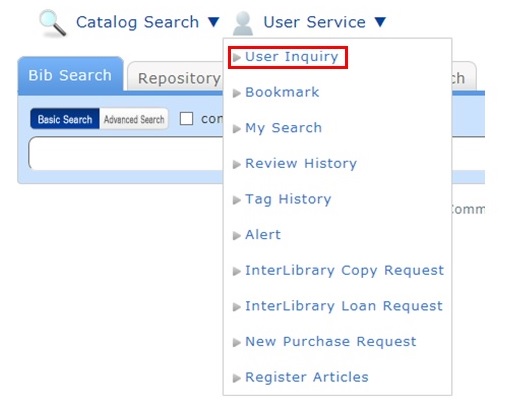
You can confirm your loaned out materials and various requested materials on the user inquiry screen.
Select "Go to ILL Request List" in the information relating to borrowing requests, among those requests.
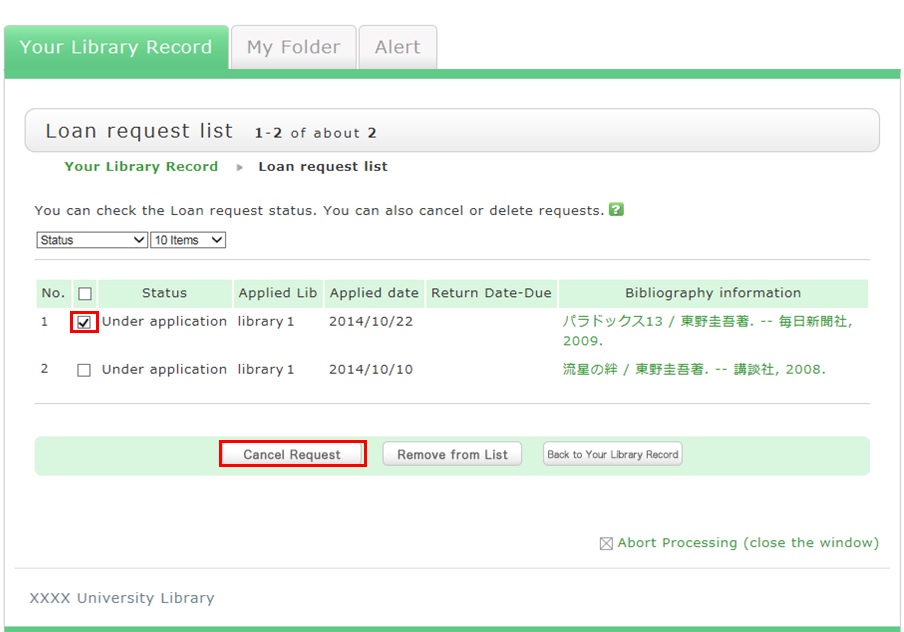
As a result, you can check a list of the borrowing requests that are current requests.
If you want cancel the request for a material in this list, place a check mark beside the material and click the [Cancel Request] button.




リンク
文献検索(外部サイト)
CiNii Researh [日本語文献]
Google Scholar [学術文献]
J-STAGE
J-GLOBAL
厚生労働科学研究成果データベース
PubMed [使い方動画/PDF]
CiNii Researh [日本語文献]
Google Scholar [学術文献]
J-STAGE
J-GLOBAL
厚生労働科学研究成果データベース
PubMed [使い方動画/PDF]
その他
カウンタ
1
7
4
2
4
1
3